Notes from building an AI product in and for SAP
TL;DR: I built ChatPTF, an AI test-script generator for SAP. v1 (RAG) cut script creation from days to under an hour and got adopted by 7 teams and demoed to over 500. v2 (agentic) shipped as a prototype over a weekend with Claude Code.
Demo of v1 — view on LinkedIn
⚠️ Beware: this is a long story about building a product inside SAP. I ramble. The intricacies are interesting, I think, but I'll understand if you don't.
Table of Contents
- The Motivation
- V1: Building Under Constraints (0 → MVP → Prod)
- V1: Getting People to Actually Use It
- V2: Going Agentic
- What's Next
The Motivation
For me it went like this. I joined the VCA team, didn't know squat. My team was newly formed, so I had two very experienced teammates beside me. While they (thankfully) took over the design and implementation for our core work, I was to implement test automation. This was when I was introduced to PTF (Process Test Framework) — the internal e2e testing tool. After months of learning to use and enhance PTF, there was a clear gap between what users could get PTF to do and what PTF was really capable of doing.
The problem with PTF was that documentation was available but scattered and difficult to understand (and honestly, no one's reading all that). And if you did manage to understand, creating a test script for a scenario meant searching through existing scripts to refer to, business objects and actions to use per step, and figuring out test data for each step. It took days, sometimes even weeks to get one script up and running.
So the need for something to fill this gap was real. I faced the issues with PTF, and so did my teammates that joined after me. Turns out, this was an issue from pretty much every user. So I knew I had to build. So build I did.
V1: Building Under Constraints (0 → MVP → Prod)
While the larger vision was clearly a one-stop solution for all things e2e testing — scheduling, sharing, agentic test script generation and healing — the initial version had to be hyper-specific. One problem, solved well. So I took up script generation based on natural language and, as an add-on, doc search — to help users understand how to actually get things done with PTF. If you've seen the early version of Google AI Mode where it tells you to look up something on Google, no joke, this was my target for v1.
In a couple of weeks, I used evenings and weekends to put together an MVP. The lack of support and funding takes you to some very scrappy places. I had a prototype running, with small Llama models to avoid any costs. It was a Next.js frontend, with a FastAPI/Python backend. A PostgreSQL db for everything — user/auth, PTF data, AI embeddings with pgvector, and chats.
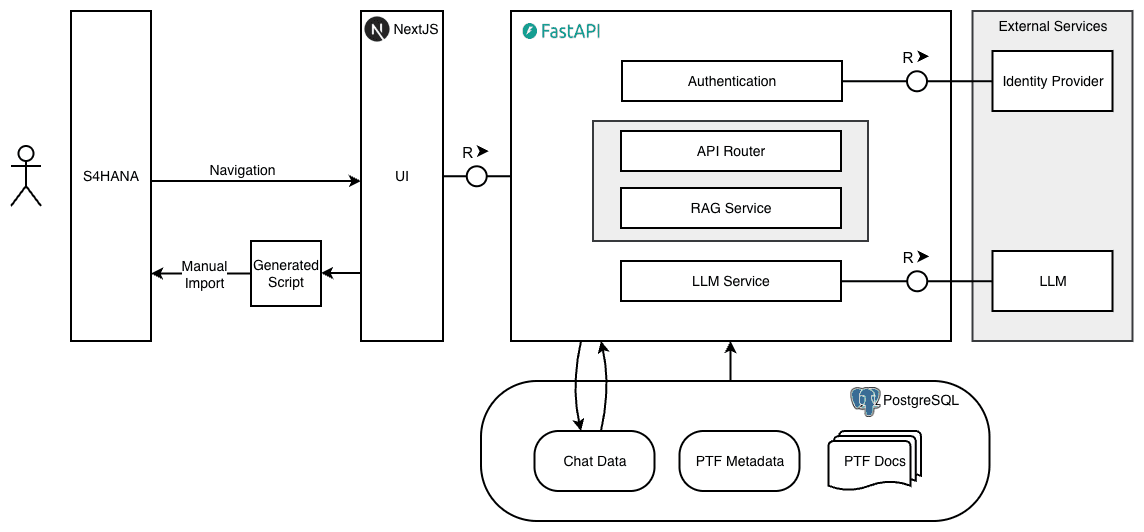
A simple RAG architecture wouldn't cut it. Believe me, I tried. These models left very little margin for error. The harness had to be engineered efficiently, otherwise you'd be left with nothing but hallucinations. Turned out later that my scrappy solutions to make Llama models work were exactly what made the eventual hosted models work efficiently.
A simple RAG architecture meant docs and PTF data indexed, chunked, embedded into my db, semantic search to retrieve and provide as context into the Llama model. The problem with a small local model was — give it more than one task and it has more than one opportunity to mess up.
I tried reranking and HyDE to no success. Reranking added latency without measurably improving the small model outputs. HyDE consistently hallucinated technical terms that didn't exist in the corpus. What worked was to decompose the task into small, manageable tasks within the harness itself. A user can most likely ask one of 5 things to this app:
intent: general— a generic hello → routed to the model with no context, just a doorman greeting you.intent: explain_docs— an explanation for a PTF concept → routed to a model with context from just the docs.intent: explain_metadata— an explanation for a specific PTF data → same as before but the context was only the PTF metadata, no need for docs.intent: extend_metadata— how to enhance something in PTF → this needed docs and PTF metadata.intent: generate_script— when the user wanted a script for a scenario → this was more interesting than the rest, with a query decomposition step to split the query into its logical steps. Then iterating per step to find the right BO and action. Once these were found, I'd look for test data for the pair. That makes one step. Done for each step and merged together, you have the complete script.
Another issue was in the retrieval itself. A lot of PTF data was very specific technical terms. A semantic search would not retrieve this. So I used a hybrid approach: semantic + BM25 keyword search. What each method missed, the other would find.
So the RAG pipeline finally looked like this:
User query → classify the intent and extract PTF entities → hybrid retrieval based on intent + step-by-step decomposition for script generation.
A real pigeon's nest, but it worked beautifully.
With the system working well — early-Google-AI-Mode well, essentially at zero cost — it was time to demo it to my team and get some proper backing. I showed it to my teammates who loved the idea and were on board with the vision. My manager liked it too but was hesitant on my time spend, so I was told to go ahead with it but to not let it distract me from priority tasks. Good enough. I also got access to SAP AI Core and a BTP (Business Technology Platform) trial account. I kept the Llama approach (to save on token spend during development) and implemented a router that checked the environment for a dev env to route requests to Llama models during development and AI Core on prod.
I essentially had two months and two other colleagues willing to contribute but very new to the domain and tech. I quickly got an onboarding task ready for any new contributors (beginners to advanced) that would take a day or two to complete and get familiar with the project. From day 1, I tracked tasks on GitHub through issues, so I set up a code review bot as well to ease my workflow. With this set in place, the next big challenge was deployment. With guidance from Claude and Gemini, I was able to deploy ChatPTF on BTP through Cloud Foundry instances.
V1: Getting People to Actually Use It
I had the opportunity to demo the prod version of ChatPTF to the maintainer of PTF, to share the vision, exchange ideas, and collaborate. One of the reasons why ChatPTF could not be agentic from the beginning was that PTF didn't expose any APIs I could use. This conversation initiated the development for this from their side and led to the eventual v2 for ChatPTF.
I also got to demo ChatPTF during the Global Logistics Day at SAP. An event with over 500 engineers and leaders watching, the demo was a success, and the biggest driver for adoption among teams using PTF, with users reaching out to try out ChatPTF and getting back to me with feedback I could iterate on. I also personally reached out to people with multiple PTF scripts created in the system with a demo and onboarded them.
This got me to more than 7 teams (as of today) across logistics, transportation management, finance, and handling unit teams, to start using ChatPTF as their AI helper on top of PTF. The demand for an agentic system was also very clear from all the feedback:
Don't just tell us what to do — do it.
V2: Going Agentic
Post v1 demo, I was told to pause efforts on ChatPTF. Understandable, given we had new development topics at VCA and a customer ticket queue piling up.
But the weekend was mine, and my vision for ChatPTF still hadn't reached its logical conclusion. So, Friday night, I came up with an implementation plan. The whole thing took two days. And with Claude taking the driver's seat, I orchestrated it — both of us locked in, standing on business.
ChatPTF was always built to be an agentic system. While I was waiting for the PTF team to get back to me with the APIs, I restructured the system to handle an agentic loop. I found ways around the APIs — directly accessing PTF tables from the system through ADT SQL, inspired by the existing ADT MCP. This solved the reads side of it. What was once RAG on a snapshot of data in the system, was now fetching live data through agent tools. And once the APIs were ready, writing to the system was also available. I added multiple tools for the agent. It could fetch data from PTF tables in the system of your choice, look for scripts, update them, create new scripts, and even run them.
Now the agent could take action. Just as important, maybe even more, was the design question — where does the human-in-the-loop boundary go? So I decided: writes stage to ChatPTF's own db, and the user had to click save and 'sync to SAP' explicitly, leaving the sync function out of the agent's toolbox. The agent can compose. The user commits. Reads and script runs are direct — users were doing this manually all day anyway, so this wasn't a new risk.
I also added a "My Scripts" page allowing users to save their scripts (from SAP or from the agent) into ChatPTF. Then came the dashboards. At present, teams use another tool to schedule the execution of PTF scripts. The process to get a script from a system into the scheduling tool is a workaround that was adopted and never improved. It involved converting the PTF scripts into eCATT objects with different systems, adding them to test configs, and the configs into test plans for every new script. Dashboards on ChatPTF solves this. You can add scripts into a dashboard and run them from there. No extra steps. You can also use the analyse button from the dashboard to open a new chat and get the agent to look into the failures, if any.
The main tech behind v2 is a single agent with 21 tools across 7 modules. I removed the PTF tables from the RAG scope and from my db and replaced it with tool calls. A single agent worked, mainly because the scope was small enough and the tasks are sequential by nature. Auth was based on user cookies to connect to their SAP systems — so the agent would act on behalf of the user, with the exact permissions that the user has.
The pivot, in one line:
v1 was a constrained-LLM orchestrator over stale ingested data — the LLM was a classifier and selector inside a hardcoded pipeline.
v2 is a single-loop tool-using agent over live SAP — the LLM drives, 21 typed tools execute against OData v4 / RAP / RFC-shaped reads, and one terminal
propose_scripttool synthesizes a script proposal that the frontend persists.
The pivot was enabled by trustworthy live data; the simplicity of one agent is earned by typed tools and a tight 8000-char-per-result discipline rather than chosen for ideology.
Architecture diagram for v2 is in progress — will add once it stops being an embarrassment to draw.
What's Next
V2 is unfinished by design. The agentic loop works. Production deployment is paused on a non-trial BTP account. Eval and observability are parked for v3. A few teams are in conversation about ownership.
Building without permission is mostly waiting punctuated by writing code. The code is the easy half, really.
ChatPTF will land where it lands. I take the architecture, the build muscle, and the distribution lessons with me regardless.